My mother mentioned that she noticed I hadn't updated my website in a long while, to which I thought hey cool at least my mom still reads it but the tl;dr version is I hate winter and am currently moping my way through another one. Not that I should complain since Seattle has received exactly 2" of short-lived snow this entire season while the rest of the country looks like Hoth Ice Planet, but still.
A status update for those interested:
Explone: writing and recording a new album. Pat's been on a hot streak with songs lately. Hopefully we'll release a few singles this year.
Kirby Krackle: still at it, gearing up for Kracklefest 4 at ECCC this year. We released a live EP of last year's show with Weird Al and there's some new stuff in the works. Kyle seems determined to step up our musical output this year and trying new things. Just this week we recorded a cover of a tune you're probably going to be just sick of in a few weeks. I'm in!
I've talked before about both bands wanting to commit to releasing more tracks instead of albums (and without the expected 2-year gap between albums) but until now we haven't really doubled down on this. It's not for nothing: both groups have high standards, and we're not just gonna knock something out in Garageband over a weekend just to get a track out the door.
Kin to Stars: on ice for now. After our Folklife show last year we took the summer off, which became the rest of year off as Jerin had an autumn wedding to plan (sorry fellas! She met an awesome guy who likes basketball, Iron Maiden AND web service architecture) and I headed off for a month of left-hand-side driving in the UK and Ireland. Not really big deal as we both have enough going on in our respective lives. However: we have these songs, see, and I'd like to get them recorded at some point. I may have to force the issue by booking some studio time.
Me:
Learning me some iOS app programming. Look for something to be released in the next few months.
Avoiding Facebook. It's utterly depressing and I dread even looking there. Waiting for FB to follow MySpace into the abyss.
Mixing and remixing songs I might release someday, maybe. I had an awesome plan to hide each song download behind an interactive puzzle on a special website. I was super-excited about this until about a week ago when I realized I'd wasn't because I'd forgotten all about it.
Reading sci-fi.David Marusek (future world of surveillance), Paolo Bacigalupi (future world of poverty), Ben H. Winters (no future: world about to explode). Not as depressing as they sound, trust me!
And comics. Yeah yeah we all read Saga but have you read Prophet?
Playing games. I gobbled up Year Walk and Device 6 and can't wait for more Myst-like stuff like that. Not really excited for anything console-based, though. I'm basically tapping my foot impatiently waiting for the last Borderlands 2 DLC.
Looking at a big backlog of unpublished blog posts that I ocassionally re-read (and even rewrite a bit) before closing the browser.
If you only watch one video from this year's XOXO festival it should be this one by Jack Conte of Pomplamoose. He talks candidly about his band's rise to fame only to have it stall, his struggle to get back to making things that make him happy, and his new site Patreon which is one of the best-executed ideas I've seen for helping people make money from their creations. His earnestness and excitement are infectious!
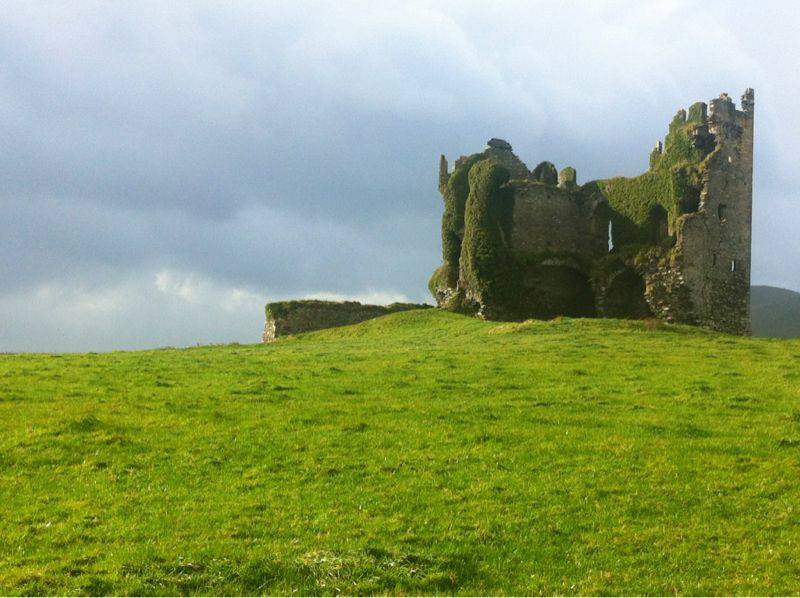
Just got back from an entire month spent in the UK and Ireland. Two weeks working in Bristol, then two weeks flitting about Scotland, Ireland and London, with a weekend side trip to Bruges, Belgium. It was all great, but I have to say I'd go back to Scotland in a heartbeat. Castles! Whisky! Sheep! The best bed and breakfasts! And I stuck my hand into the waters of Loch Ness, thrilling my inner raised-in-the-70s child who spent many hours reading about the legendary monster. The photo above is Ballycarbery Castle, which just sits out in a field being awesome on the west coast of Ireland, with no public access because it's not safe to get too close to its awesomeness.
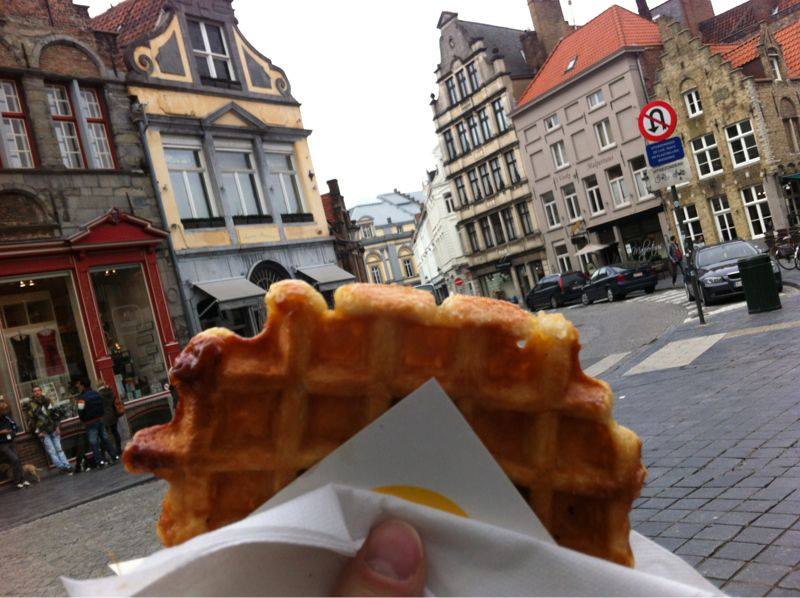
Below is my second-favorite photo: eating a liege waffle in Bruges.
You can find a few more photos of our trip on my Twitter stream. It was one of those trips where every day was so packed with stuff, it felt like we were gone for ages and yet also felt like it whooshed by in a blink. Also, my fingers ache just thinking about writing an extensive blog post about it. I think that's a sign of a good holiday.
Starting today, musicians and artists are invited to visit Artists and the Affordable Care Act. The website includes an FAQ, a list of artist-focused educational events and seminars, and links to videos and online calculators. There’s also a staffed musician-friendly hotline at 1-919-264-0418, and artists can email their questions to healthcare@headcount.org.
[T]he Affordable Care Act matters to artists–just as it matters to a lot of entrepreneurs–because it makes it easier to take chances and carve out the time that makes it possible to pursue an artistic career. These aren’t folks who are demanding instant success, or a lot of money for their art, or even consistent rather than seasonal or contract employment. Instead, they’re people who want to lower their overall level of risk, and are more than willing to pay to afford to do so. They’re folks who would like to set up their lives so that when bad medical things happen, they are merely bad, even very bad, rather than completely catastrophic.
And from the comments on that article, this quote:
Lots of union actors and musicians may not work enough to qualify for union coverage, so the ACA is a godsend for them.
All I know is this: there's this guy in Tacoma, a full-time musician, self-employed. He was helping a friend with some home repairs and fell off the roof.
There's a woman from Seattle, a gifted pianist and songwriter, and her albums receive plenty of local acclaim. The type of artist who maybe played two shows a year, but you could count on them being sold out. She was in an accident, and both of her hands were crushed. Now she can't play or work.
Every few weeks it seems there's a Facebook campaign or benefit concert fundraiser for a career musician struck with a sudden illness or injury, leaving them with a stack of bills and unable to work even a "normal" job. I don't know about you, but "have friends throw benefit concert" doesn't strike me as a particularly sound form of coverage.
Americans like to talk big about individualism and practically worship entrepreneurs. Find your passion, follow your bliss, bootstrap yada yada something Zuckerberg. Yet the ones starting down this path are often literally putting their lives at risk, reclaiming their time by leaving the shelter of corporate-subsidized health coverage. These people -- and I personally know a few -- are making a big bet that they'll find both professional success and financial security before they or a loved one are in an accident or diagnosed with something scary.
The ACA won't be perfect. But it's something, and I'll take that something over another damn benefit concert.
Just a note that I've finally (after two years!) restored my music page and given it a proper link from the homepage. You'll find all my solo stuff there along with all the work I've done with Explone, Kirby Krackle, Kin to Stars, Pet Rock Star^S and other stuff. The (still functioning!) Demo Club exclusives are in there too, if you look for them. It's all powered by the much-beloved-by-artists Bandcamp and I've set all of my own music there to pay-what-you-like.
There's a Zen concept of "non-attachment" that I like to apply to everyday life, when I'm not too stressed out to remember it. At its core is a pretty simple concept: let go of your attachment to things, because things are short-lived, and desire for things can make you miserable.
It used to be that we'd joke about ease of use by saying "even my grandmother can figure it out." But the cold facts are that there's a better than zero chance that someday we'll be grandma's age and have to deal with user interfaces designed by bratty ingrates with no respect for the Old Ways.
It seems to me that one way to avoid (or at least delay) becoming a cranky "old person" is to accept that things will change, will always change, and not become too married to our favorite apps, interfaces and ways of doing things.
Like the "Golden Ballroom" video, we shot "Trapdoor" using my iPhone 4 and edited everything in iMovie on my Macbook Pro. This time I purchased a legit Steadicam Smoothee for iPhone 4/4S to get shake-free shots as I walked around the set. I looked into some build-it-yourself steadicam tutorials online but figured I'd never actually get around to building one. At around $120 it was worth it just to get the project off the ground.
We shot everything over two weekends at Pat's parent's house in Renton. We set up in the garage and strung a 9x12 canvas painters' drop cloth (purchased at Fred Meyer) as our backdrop.
A week earlier I had built an overhead lighting rig out of black foam core (also purchased at Fred Meyer). I might have gone a little overboard with the design -- the slats in the "pallet" had Velcro strips that allowed them to be moved if we needed to adjust the amount of light streaming through the gaps. We ended up never using this feature. The foam core ensured that the rig would be lightweight and lessened the chance of killing a bandmate if it fell.
I used carabiners to attach a clamp light above the pallet, and then we hoisted it up to the ceiling, attaching it to a bicycle wall storage hook. The original lamp was a little too bluish, but we happened to find another outdoor bulb on a shelf that gave off light that was more suitably yellow.
Then we used cardboard to mask off all the windows in the garage and closed it up so that the only light source was the rig. After wrapping some paper around the rig to prevent light leakage to the sides, it started looking like this:
That's what I'm talkin' about! The iPhone camera behaved beautifully in the low light, much better than I'd hoped.
Kyle wasn't available the first day, so we set everything up as described above, then shot Patrick and Nelson's footage. It was early September and it also happened to be indescribably sweltering hot. Like high 90s hot. Not ideal for being shut up in a garage. I had originally planned to create a DIY smoke machine (you boil water and glycerine together to produce a thick steam) but the smoke went straight up to the high garage ceiling and stayed there. Heat rises, who knew? Even when we were able to pull some smoke down into the shot, it barely registered on camera. And it was already raging hot in the garage, so we scrapped it.
Weeks passed and before I knew it, it was November, and we still had to get Kyle in for his takes! So we met at the house again and set everything back up. Only this time -- it was see-your-breath FREEZING. We'd had an early cold snap and there was actually frost on the grass. If you're wondering why Kyle is the only one wearing a jacket in this video, it's because he's the smart one. Kyle manned the camera while I did my takes and it was so cold my fingers barely worked. But we got what we needed and got out of there.
So remember: when you see Pat and Nelson, they're on the verge of heatstroke. When you see Kyle and I, we're courting hypothermia. LOL.
In the time between September and November, I shot most of the jumpy nightmare scenes. I'd basically find some tools or busted up wood lying around the garage or our rehearsal space and film it for a minute or two. iMovie effects were used to desaturate the colors out and crank up the exposure to give those bits a stark, dream-fragment quality. The animated rope-curling effects are done by just adjusting the clip settings to play at high speed. The creepy security cam shots were done with an Olloclip fisheye lens and using a Glif to mount the iPhone to a camera tripod jacked up as high as it would go.
All the principal shooting was finished by November 2012. So why did it take almost a year to finish this video? Because I am a master procrastinator. Once the fun of making the set pieces and shooting everything was over, I was left with the daunting task of actually composing the thing. All that syncing! All those jump cuts! And of course I had to choose the longest song of the EP (over five minutes!) to make a video.
Here's just a partial list of things I did instead of finishing this video:
wrote and recorded a holiday song
helped a stranger record a holiday song
mixed, remixed and re-remixed some demos I'll probably never release
drew somedoodles
began an iPhone app project (not finished either!)
read a bunch of comics
rebuilt my front steps
mortared the stone walkway in front
re-shot all of Patrick's footage and then threw it away because it wasn't as good
played through Bioshock Infinite
played through Borderlands 2 and most of the DLC
played through most of The Last Of Us
…all of which probably could have waited the 10 or so hours it took me to get from an empty iMovie project to the final edit. What eventually prompted me to finish wasn't artistic desire so much as shame avoidance. Fortunately, Resistance is a coward once you start swinging your fists, and I found that all I needed to get focused was to simply watch what I had done so far.
That said, I probably won't be committing to another video project for awhile. See, Diablo 3 is coming out for PS3…
Today is my birthday. It's also my 10th year in Seattle. I was 33 when we moved here. Also, this blog is nearly 14 years old. That is CRAZY. Anyway...cake!